

Dell Pro Max GB10 Review: NVIDIA’s Mini AI Supercomputer Tested


|
Dell Pro Max with GB10 - $3,999 MSRP, as tested $5,780
Dell's take on NVIDIA's GB10 Superchip delivers all the performance of the original with excellent cooling and easy multi-system setup. |
|||

|

 |
||
We got a good look at NVIDIA's Grace Blackwell GB10 Superchip when the company's DGX Spark shipped last fall. However, NVIDIA always said it wouldn't be the only vendor offering these powerful small form factor developer AI dev machines. In this case, we've got Dell's Pro Max powered by the GB10 on the bench today. And as you scroll through, you're not seeing double; we've got a pair of these mini AI-crunching speed demons paired up for more performance.
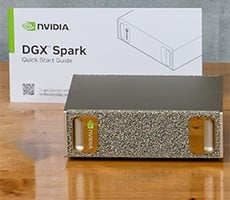
Some of our Dell Pro Max overview might seem like deja vu, as the dimensions, ports, power consumption, and performance are mostly identical between Dell and NVIDIA's takes on the GB10. We'll talk about what's different, but more importantly, we're going to get into some tasks and testing that we couldn't quite manage with a single DGX Spark. But before we do that, let's take a moment to meet the new Dell Pro Max with GB10.
Dell Pro Max With GB10 Specs and Build
Find The Dell Pro Max With GB10 @ Dell.com
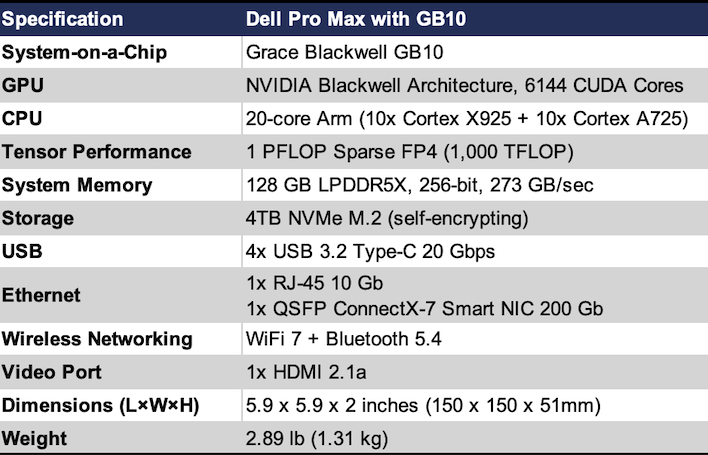
Internally, the Dell Pro Max is very similar to NVIDIA's DGX Spark, and that's a good thing. It's got a full-fat GB10 Superchip inside, which has the 20-core Arm64 processor with 10 Cortex X925 and 10 Cortex A725 cores, the Blackwell-based GPU with 6,144 CUDA cores, offering up to a full petaFLOP (1,000 teraFLOP) of sparse FP4 performance, and that very large 128 GB pool of LPDDR5X memory on a 256-bit bus, with the same 273 GB/sec of bandwidth. It even has a 4TB SSD just like the DGX Spark.
The port layout is identical, as well. There's a total of four USB-C ports, with the outermost dedicated to the included USB-C PD power adapter. The other three ports support DisplayPort and USB 3.2 2x2 20 Gigabits of throughput. There's also a 10 Gigabit Ethernet RJ-45 jack and an HDMI 2.1b port for up to 8K 60 video output. And lastly, there's a pair of QSFP ports for a pair of ConnectX-7 Smart NICs that each support up to 200 Gigabits per second. Thanks to an included QSFP cable to tether our two Dell Pro Maxes together, we'll be able to see what multi-node performance we can wring out of these puppies.

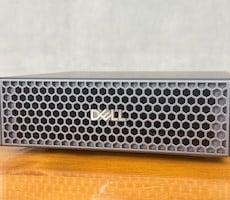
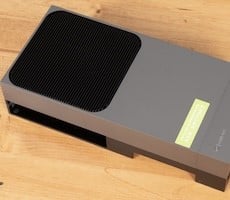
Where the Dell Pro Max differs is in its chassis. Dell's L6 chassis has a much more subdued appearance compared with the gold of NVIDIA's machine. The chassis is built for cooling, as the front is wide-open with a honeycomb design that allows plenty of air to enter the chamber to keep the Grace Blackwell chip cool. At 2.89 pounds, it's just a couple ounces heavier than the DGX Spark, but the dimensions are pretty much identical. The L6 chassis was built to be stacked, as the two systems sit on top of each other and don't interfere at all with Wi-Fi or Bluetooth performance.
Dell Pro Max Software Experience
Dell shipped the Pro Max running a lightly-skinned version of NVIDIA's DGX OS version 7, which itself is based on Ubuntu 24.04 LTS. After creating a local user account and connecting to the Internet, the system automatically updated itself to the latest release of the operating system, including the DGX SDK. While some folks have been running games on GB10 systems, out of the box, it's definitely a development tool.During the review period, the system pretty well kept itself updated, as well, thanks to Ubuntu's graphical software updater. It pulls the core OS directly from NVIDIA's repository and keeps going in lockstep with NVIDIA's own hardware. All of the playbooks and code samples that NVIDIA hosts on its GitHub repository for DGX Spark are compatible with the Pro Max right out of the box. You're not giving up anything to bypass NVIDIA's system to go with Dell. While that compatibility is expected, it was nonetheless a relief to experience as we got going.

Dell sent along a pair of QSFP cables so we could run these systems in tandem, and I kept looking at them longingly while I went through the process of getting each Pro Max set up individually. Patience is a virtue, and so we have to start with some solo testing. So lets do some of that first...
Dell Pro Max: Single System Performance
Last year when we looked at the DGX Spark, we were digging into the system with less experience, during a pre-release period. We had to work closely with NVIDIA's engineers and ran into a few issues, as you'd expect with something brand new. More than half a year later, NVIDIA's software stack for Grace Blackwell has blossomed, and so has the developer documentation.It's also grown quite an excited community around performance testing and leaderboards. Spark Arena is the community-driven LLM leaderboard, and the community benchmark framework around it is called Sparkrun. It can give us some very detailed results for a wide variety of models, but we needed to pick some realistic scenarios.

A long-running benchmark that will generate loads of data running in sparkrun
Installation is straightforward. The heart of it all is sparkrun from Spark Arena. On both devices, install the uv package manager if it's not already installed, hit the terminal and enter one command: uvx sparkrun setup and hit enter. From there, you can browse benchmarks and find all kinds of models of different sizes to run on plenty of hardware, not just GB10-based systems like the Dell Pro Max. We ran several benchmarks, and our advice to you is to just be prepared to wait. If you're thinking you'll have results in 30 minutes, start with a small model. Otherwise be prepared to wait hours, and wait we did. We think the results are worth it, though.
There's a lot of data coming out of this file, but what's really important (and thus, what we're reporting below) is throughput in tokens per second. That's the result on these charts. And the different entries are for context depth and concurrency (the number of simultaneous requests). To understand the files and visualize the data how we wanted, we built a semi-custom dashboard with the help of React and the popular Recharts library.

Okay, so first we're looking at a Qwen 3.5 model with 27 billion parameters stored as FP8 running in the SGLang framework on a single node. Going up the side is the number of tokens per second and going across is the growing context window. Think of context as a chat history. The different lines are for concurrency. C1 is a single concurrent request at a time, while C10 is ten concurrent requests.
On a single Dell Pro Max, two concurrent requests is actually faster with a context window of 8k tokens, presumably because a second set of requests fills up the 4k window quickly. We're only reporting full context windows here; sparkrun can generate a set of runs with a fresh and empty context window, but those numbers weren't all that different.
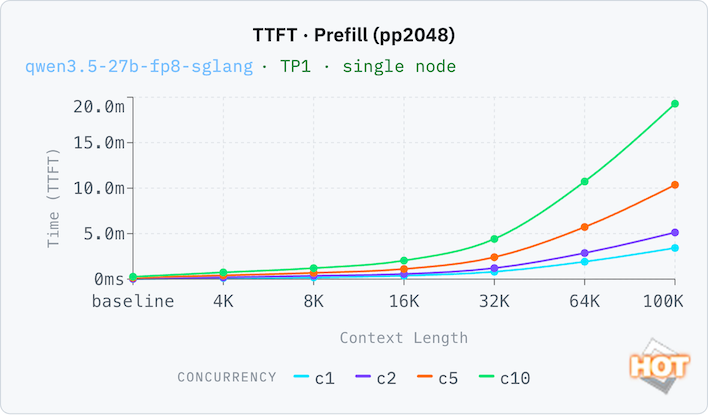
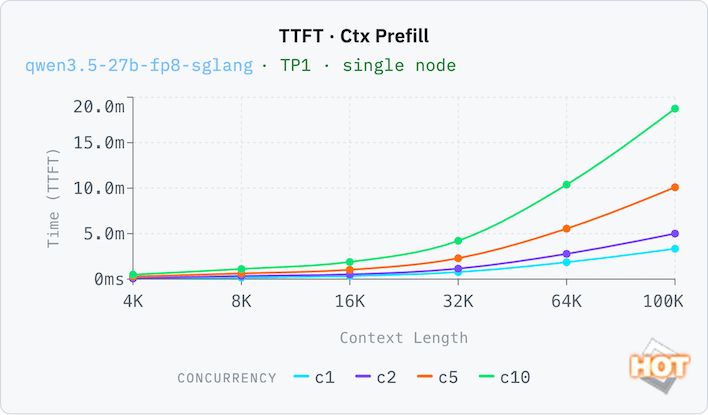
To prove that point, let's look at the time to first token (TTFT) with both an empty context (pp2048) and a filled one (ctx_prefill). Thanks to its large pool of memory, the Dell Pro Max can run with a relatively generous context window with decent results. A 32K context window (that's 32,000 tokens, which is a whole lot more than 32 kB; this is actually a lot of memory here) still has reasonable responsive times of around 35 seconds with both a full and an empty context window. Response times compound with each doubling of the context window, which you'd expect, but concurrency is not a linear time increase. C10 is only 8x the time of C1 at 32k, for example, going from 33 seconds to 252 seconds.
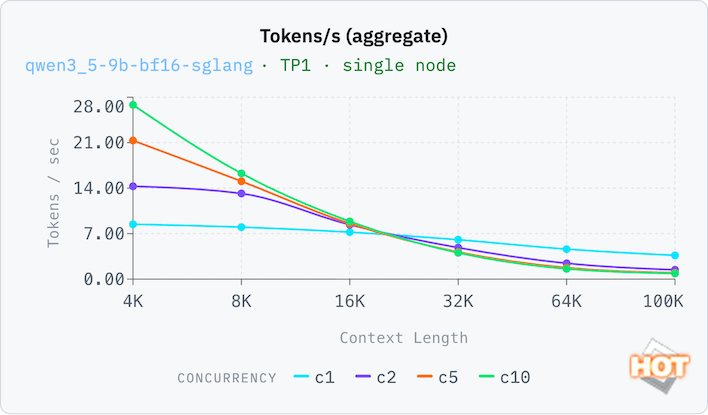
One more set of results, this time on a smaller model. A 9B token model is the sort of thing that on-device AI would run on a consumer system at FP8, but a BF16 data format trades in memory efficiency for somewhat better accuracy. With our full context window, performance isn't great on C1, and C10 aggregate throughput is nearly 4x better. That means a small, highly-accurate model isn't necessarily the best choice for this system. Performance doesn't drop off too badly on C1 (which a local AI model would utilize most often) as the context window grows.
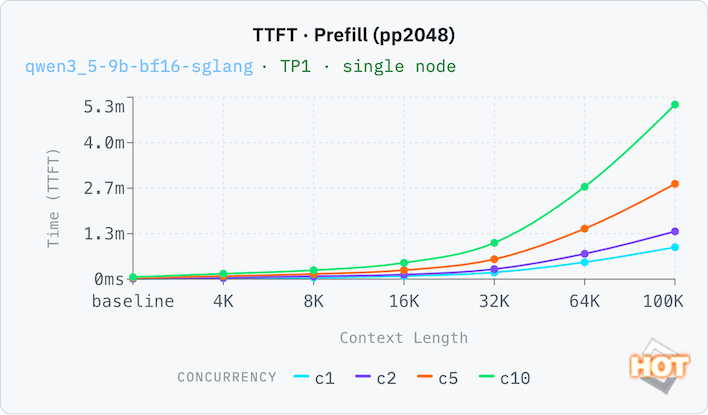
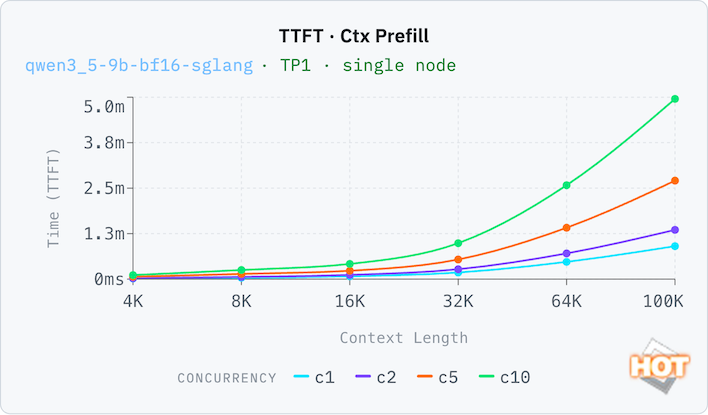
On the smaller model, the TTFT is still very usable on a single-concurrency load up to a 16K token window, with around a six-second wait time before it starts responding. Beyond that, we'd probably be looking at batch inference loads.
There's also a playbook from NVIDIA to get LM Studio running on the DGX Spark, which also works just fine on the Dell Pro Max. This will let us compare the Pro Max to something else with a large pool of unified memory, a 2025 Apple Mac Studio with M4 Max. The playbook is a pretty manual setup since LM Studio isn't officially ready for GB10, but there is an LM Studio server, and we can send requests via the API. This is perfect, actually, because you can set it up in an office and enable LM Link, then connect LM Studio to the Dell Pro Max remotely. LM Link is in preview, but when we requested access we were granted it almost immediately.
We used the official Gemma 4 31B Instruct model from the LM Studio catalog, in its Q4_K_M GGUF format. It's a 19.9 GB download and when loaded into memory with a 16K context window occupies 21 GB of RAM. This model is too big for most consumer GPUs to run, but is the perfect entry point for something with a large pool of unified memory like the Mac Studio or the Dell Pro Max.
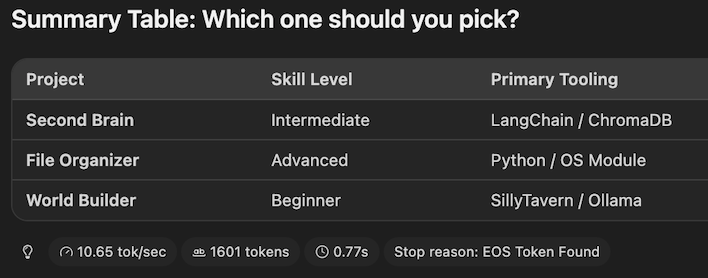 \
\Dell Pro Max results in LM Studio for Gemma 4 31B
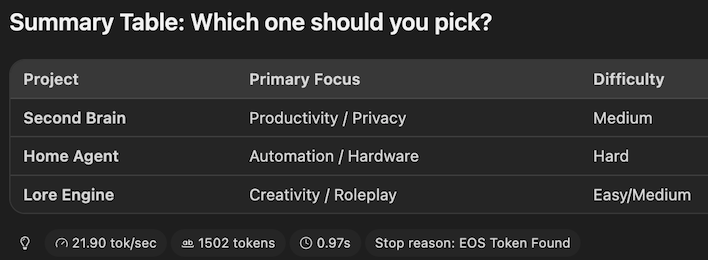
At the end of our run, the Mac Studio reported that it generated its response with a speed of 21.9 tokens per second. Meanwhile, the Dell Pro Max offered up 10.65 tokens per second, or almost exactly half as fast as the Apple machine. This is a difference you can really feel, especially if you're a fast reader that can follow along as it types out. However, the time to first token (indicated by the clock icon) was a bit faster on the Dell Pro Max at 0.77 seconds compared to 0.97 seconds on the Mac.
In our previous review with the DGX Spark, we found that the Mac Studio outran NVIDIA's machine, too, and this cements the GB10 Superchip as more intended for development and testing, not necessarily everyday usage. Dollar for dollar, it's hard to beat the performance Apple offers for end-users, though NVIDIA's SDK makes the Dell Pro Max a much more palatable development tool.
Alright, we've got two of these Dell Pro Max machines, so it's time to link them together into one mega machine. Let's dive into some more testing on the next page...